
Sticky Lifecycle Hooks
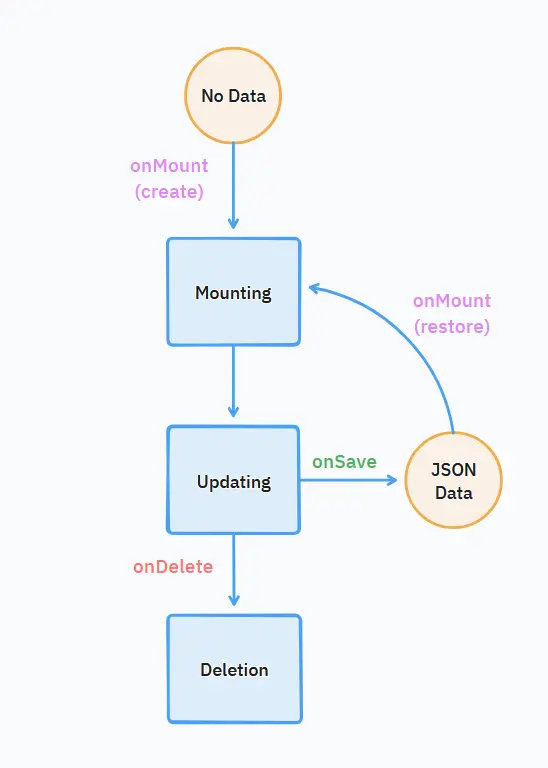
To allow plugins to manage their state and behavior within the application, the sticky component provides three core lifecycle functions that your plugin should implement: onMount, onSave, and onDelete. These functions act as hooks, called by the system at specific points in a sticky's existence.
This diagram illustrates the sequence and triggers for these lifecycle functions:
onMount(sticky, origin)
This function is called when a sticky is added to the workspace, either through user action or restoration from saved data. It's the primary place for your plugin to perform initial setup.
Arguments:
sticky: The sticky HTMLDivElement instance. This object inherits Div element attributres and methods, and potentially apluginConfigproperty (see below).origin(string): Indicates whyonMountwas called:"create": The sticky was newly created (e.g., user clicked an 'add sticky' button)."restore": The sticky is being recreated from previously saved data.
Purpose:
- Initialization: Set up the sticky's initial state, appearance, and behavior.
- DOM Manipulation: Populate or replace the content of the sticky's body.
- Add Controls: Add custom buttons or widgets to the sticky's header.
- Restore State: If
originis"restore", use the data available insticky.pluginConfig(populated from a previousonSavecall) to restore the plugin's state.
Example Usage:
// Example plugin implementation
onMount(sticky, origin) {
  if (origin === "create") {
    // This sticky was just created. Maybe ask the user for initial input.
    // e.g., sticky.replaceBody = h('<input placeholder="Enter URL" />');
    // attach event listener to the button...
    console.log("New sticky created, performing initial setup.");
  } else if (origin === "restore") {
    // This sticky is being restored from saved data.
    // Use sticky.pluginConfig to set up the state.
    // e.g., const savedUrl = sticky.pluginConfig.url;
    // displayContentBasedOnUrl(sticky, savedUrl);
    console.log("Sticky restored from data:", sticky.pluginConfig);
  }
  // Common setup for both create and restore can go here.
}
onSave(sticky)
This function is called when the application needs to save the sticky's state. This typically happens explicitly when the user saves, or automatically just before a sticky is about to be deleted.
Arguments:
sticky: The sticky instance object.
Purpose:
- Persist State: Return a JSON-serializable object containing all the necessary data required to restore the plugin's state later using
onMount(withoriginas"restore").
Return Value:
- A JSON-serializable object representing the plugin's state, or
null/undefinedif there's nothing specific to save for this plugin. The returned object will be stored and passed back assticky.pluginConfigduring a subsequentonMountcall withoriginset to"restore".
Example Usage:
// Example plugin implementation
onSave(sticky) {
  // Assume plugin logic stores data in a 'plugin' namespace
  if (sticky.plugin) {
    return {
      videoId: sticky.plugin.videoId,
      autoplay: sticky.plugin.shouldAutoplay,
      lastPosition: sticky.plugin.currentProgress,
      // Any other data needed for restoration
    };
  }
  // Or return nothing if this plugin has no state to save
  // Explicit return statement is not required
}
onDelete(sticky)
This function is called just before a sticky is removed from the workspace. It's the designated place for cleaning up resources used by the plugin.
Arguments:
sticky: The sticky instance object.
Purpose:
- Resource Cleanup: Release any resources that are no longer needed once the sticky is gone. This prevents memory leaks or unnecessary background processes. (e.g., Object URLs)
- Stop Processes: Cancel any ongoing operations like timers (
setInterval), intervals (setTimeout), pending network requests, or event listeners associated specifically with this sticky instance.
Example Usage:
// Example plugin implementation
onDelete(sticky) {
  // If the plugin created an object URL
  if (sticky.plugin && sticky.plugin.imageUrl) {
    URL.revokeObjectURL(sticky.plugin.imageUrl);
    console.log("Revoked Object URL for sticky:", sticky.id);
  }
}
Summary
onMount(sticky, origin)- When: Called upon sticky creation (
origin == "create") or restoration (origin == "restore"). - Use: Initialize the plugin, set up DOM elements, and restore state using
sticky.pluginConfigif applicable.
- When: Called upon sticky creation (
onSave(sticky)- When: Called on explicit save actions and automatically before deletion or application shutdown.
- Use: Return a JSON object containing essential data needed to fully restore the plugin's state later via
onMount.
onDelete(sticky)- When: Called just before the sticky is destroyed.
- Use: Clean up any resources, timers, intervals, or listeners specific to the sticky.
You can read sticky plugins source code to understand practical usage.